Console Guides
Stablecoin Payments
Accept USDC, USDT, and RLUSD non-custodially — deposit addresses are created per currency/network pair and funds land directly in your own wallet.
Find it
Stablecoin is in the sidebar under the Revenue group. Enabling it requires your org's identity verification (KYC) to be Approved first — the Enable stablecoin button stays disabled until then.
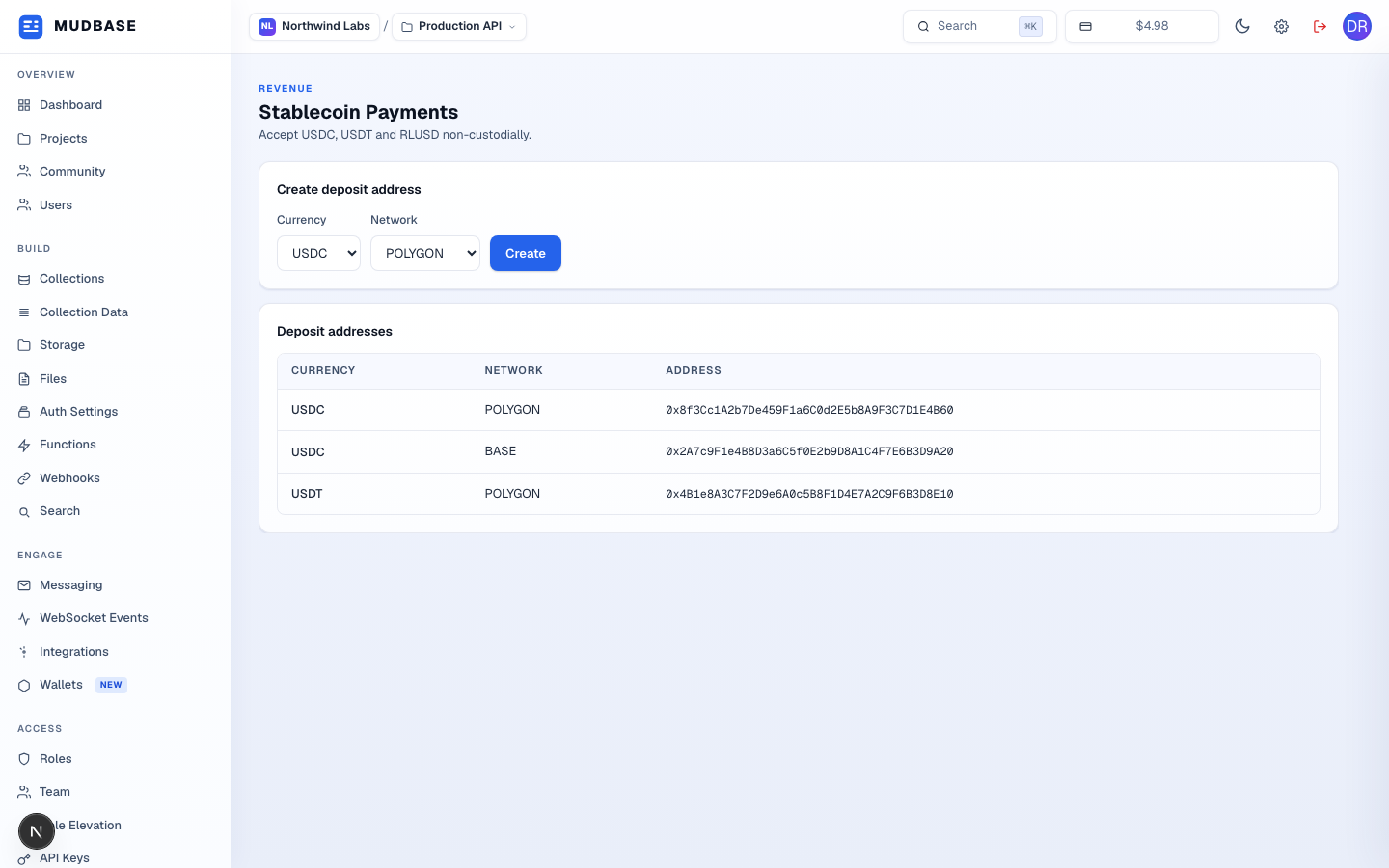
- Pick a currency (USDC, USDT, or RLUSD) and a network — the network options narrow to whatever that currency can actually settle on (e.g. RLUSD is Ethereum only).
- Requests a deposit address for the selected pair. If one already exists for that exact currency/network combination, the existing address is returned instead of creating a duplicate.
- Every deposit address this org has created, with its currency and network — this is where customer or checkout-link payments actually land.
Note
Enabling stablecoin (
enableStablecoin) and creating an address (createDepositAddress) both live in services/flutterwave/flutterwaveStablecoinService.js and share one Flutterwave v4 customer per org, cached on first use — after that, enabling or adding another network/currency pair never re-provisions the underlying provider customer.